Target element to display explanation.
AI-driven inventory management
AzinvSpace
Track your stuff, not your stress
AzinvSpace turns household storage into a visual map of rooms, stands, containers, and items so you can stop guessing where things went.
The AI-assisted packing flow lets you scan while you pack, capture items quickly, and save the container structure while it is still in your hands instead of rebuilding it later from memory.
QR lookup, searchable inventory, and shared household access keep the physical world and the app in sync, which is especially useful when you are moving, rotating seasonal storage, or trying to pack faster without missing anything.
Install in 3 steps
Open AzinvSpace on your phone, open the browser menu, and choose the install option.
- 1 Open this site on your phone.
- 2 Open the browser menu or the share menu.
- 3 Choose the option to install the app or add it to your home screen.
The exact wording can differ by browser.
Example
How it looks like
This is the live preview of how data organized for your household, which you can build
Rooms
4| Name / Location | What is here |
|---|---|
|
Basement
Under the Stairs |
1 Stand
2 Containers
6 items
|
|
Garage
Back Corner |
1 Stand
2 Containers
6 items
|
|
Storage Room
Detached Building |
1 Stand
2 Containers
6 items
|
|
Workshop
Floor -2 |
1 Stand
2 Containers
6 items
|
Stands
4| Name | Counts |
|---|---|
|
Cabinet · red
Overflow stock |
Total shelves: 3
2 Containers
|
|
Shelves · red
Daily essentials |
Total shelves: 3
2 Containers
|
|
Stand · yellow
Seasonal storage |
Total shelves: 3
2 Containers
|
|
Stand · blue
Cleaning supplies |
Total shelves: 5
2 Containers
|
Containers
8| Name | Counts |
|---|---|
|
Stand(yellow)Bag
Packed for storage |
|
|
Shelves(red)Bag
Small accessories |
|
|
Cabinet(red)Bag
Backup stock |
|
|
Cabinet(red)Bag
Packed for storage |
|
|
Stand(blue)Box
Packed for storage |
|
|
Shelves(red)Box
Packed for storage |
|
|
Stand(blue)Box
Sorted spare parts |
|
|
Stand(yellow)Container
Quick-grab supplies |
|
Items
24| Name | Category |
|---|---|
|
Board Game
Workshop (Floor -2)
Shelves · red
Box
|
entertainment
|
|
Board Game
Storage Room (Detached Building)
Stand · yellow
Container
|
entertainment
|
|
Candles
Storage Room (Detached Building)
Stand · yellow
Bag
|
decor
|
|
Crayons
Workshop (Floor -2)
Shelves · red
Bag
|
kids
|
|
First Aid Kit
Basement (Under the Stairs)
Stand · blue
Box
|
safety
|
|
Glue Stick
Basement (Under the Stairs)
Stand · blue
Box
|
office
|
|
Glue Stick
Storage Room (Detached Building)
Stand · yellow
Container
|
office
|
|
Hammer
Basement (Under the Stairs)
Stand · blue
Box
|
tools
|
How the app works
This scene shows how a room, stands, marked boxes, AI item scan, and an unmarked box fit together in one storage flow.
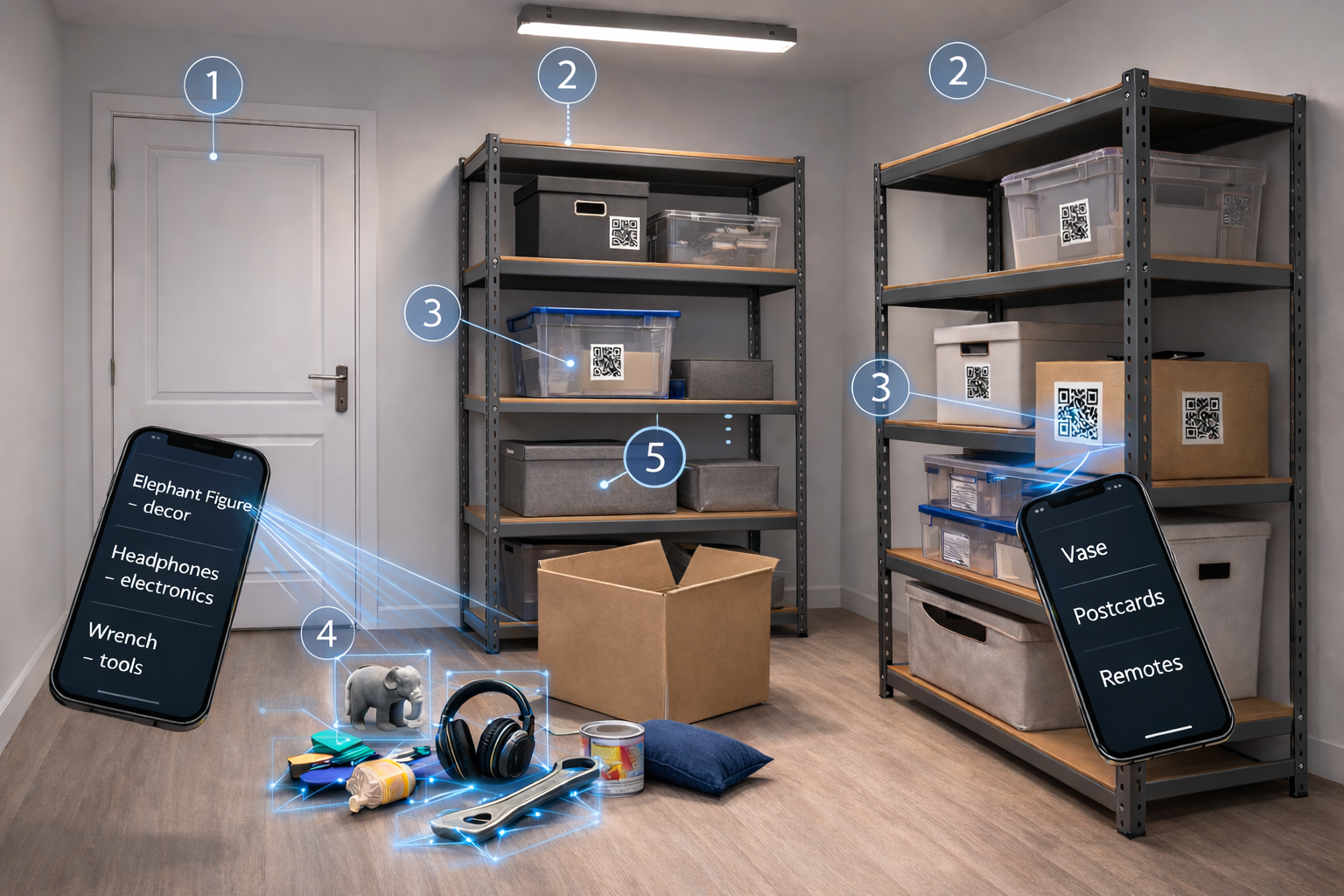
Hover, focus, or tap a numbered marker to see the explanation.